ESP32
ESP32 Overview
The ESP32 is a powerful microcontroller widely used in Internet of Things (IoT) projects due to its versatility and rich feature set. It is developed by Espressif Systems and offers an array of capabilities that make it an ideal choice for a wide range of applications.
Key Features and Capabilities:
-
Wi-Fi, Bluetooth Connectivity and Bluetooth Low Energy(BLE):
The ESP32 provides built-in Wi-Fi and Bluetooth connectivity, allowing seamless integration into wireless networks and communication with other devices. The BLE is a wireless communication technology that consumes less power compared to traditional Bluetooth. It is commonly used in various applications, such as IoT devices, fitness trackers, and smartwatches, enabling efficient and energy-saving data transfer over short distances. -
Powerful CPU:
It is based on the Xtensa dual-core 32-bit LX6 microprocessor, operating at up to 240 MHz, providing sufficient processing power for complex tasks.Due to the presence of the dual core we can write true parallel operations i.e we can perform two different tasks at the same time without involving time slicing or preemptive scheduling, in this case execution time of one task doesn't affect another task. -
GPIO Pins:
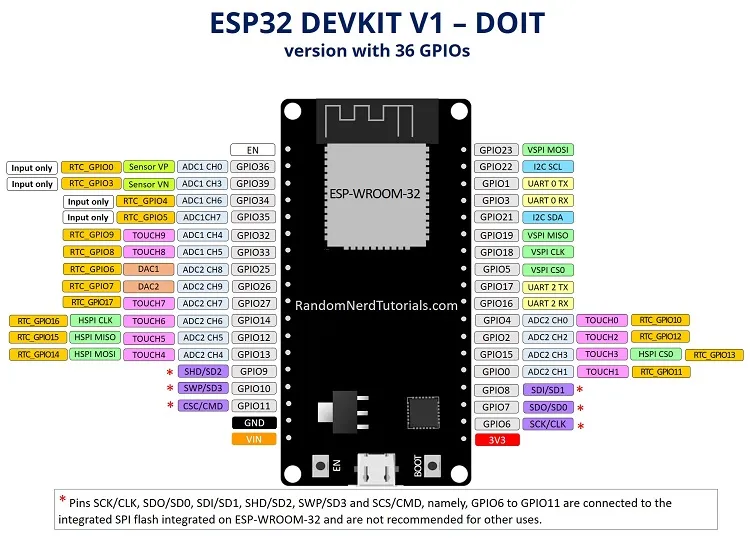
With a large number of General Purpose Input/Output (GPIO) pins, the ESP32 facilitates the connection and control of various external devices, sensors, and actuators. -
Communication Protocols:
It supports various communication protocols such as I2C, I2S, SPI, UART, and more, allowing seamless integration with other devices and peripherals. -
Low Power Consumption:
It is designed to operate efficiently with low power consumption, making it suitable for battery-powered and energy-efficient applications. ESP32 will go into deep sleep mode for energy energy-saving -
RTOS Support
Real-time operating system (RTOS) support through which we can achive parallel tasking, low memory foot print and many other advantages
In this documentation, you will learn how to work with the ESP32, optimize its performance, and make your projects more efficient. You will also explore topics such as GPIO configuration, using the ESP32 with FreeRTOS, controlling servo motors, and more.
ESP32 GPIO Configuration
In this section, we will delve into the GPIO functionality of the ESP32, covering digital input/output, interrupt handling, and GPIO pin configuration.
-
GPIO Basics:
GPIO pins can be configured as either input or output, allowing them to interact with digital signals from external devices or control the state of connected components. Each GPIO pin on the ESP32 is identified by a specific number or label, such as GPIO0, GPIO2, etc. These pins can typically handle both digital signals (binary values of HIGH or LOW) and analog signals (continuous voltage values). -
GPIO Pin Configuration:
To configure a GPIO pin on the ESP32, you can utilize the ESP32 Arduino core library or the ESP-IDF (ESP32 IoT Development Framework) directly. The configuration involves specifying the pin number, mode (input/output), and additional settings such as pull-up/pull-down resistors, interrupt type, etc. -
Digital Input:
When a GPIO pin is configured as a digital input, it can be used to read the state of an external device or sensor. You can use functions like pinMode() to set the pin as INPUT and then use digitalRead() to obtain the current state of the pin (HIGH or LOW). This functionality is useful for reading buttons, switches, or other digital signals. -
Digital Output:
Configuring a GPIO pin as a digital output allows you to control the state of external devices or actuators. Using pinMode() to set the pin as OUTPUT and digitalWrite() to set the pin state to HIGH or LOW, you can control LEDs, relays, motors, and other digital components. -
Interrupt Handling:
GPIO pins on the ESP32 also support interrupt handling, which allows you to respond to specific events or changes in the pin's state. By configuring the pin as an interrupt input using pinMode() and attaching an interrupt handler function with attachInterrupt(), you can execute custom code whenever the pin's state changes. Interrupts are commonly used to handle button presses, sensor events, or time-sensitive operations.
Comparison between ESP32 and Arduino
| Features | ESP32 | Arduino Uno |
|---|---|---|
| Microcontroller | ESP32 | ATmega328P |
| Operating Voltage | 3.3V | 5V |
| Processor Speed | Up to 240 MHz | 16 MHz |
| Flash Memory | Up to 4MB | 32KB |
| RAM | Up to 520KB | 2KB |
| Digital I/O Pins | Up to 36 | 14 |
| PWM Output Channels | Up to 16 | 6 |
| ADC Channels | Up to 18 | 6 |
| DAC Channels | Up to 2 | 0 |
| Deep Sleep | Present | Absent |
| Bluetooth | Present | Absent |
| Wi-Fi | Present | Absent |
| Hall Sensor | Present | Absent |
| Temp sensor | Present | Absent |
| Touch Sensor | Present | Absent |
There are also 10 capacitive touch sensors,4 SPI bus channels, 2 I2C bus connections, 2 I2S connections and 3 UARTs for serial communication